
Scientia Conditorium
[혼만파] 혼공학습단 14기_혼자 만들면서 공부하는 파이썬 1주차 본문
[혼만파] 혼공학습단 14기_혼자 만들면서 공부하는 파이썬 1주차
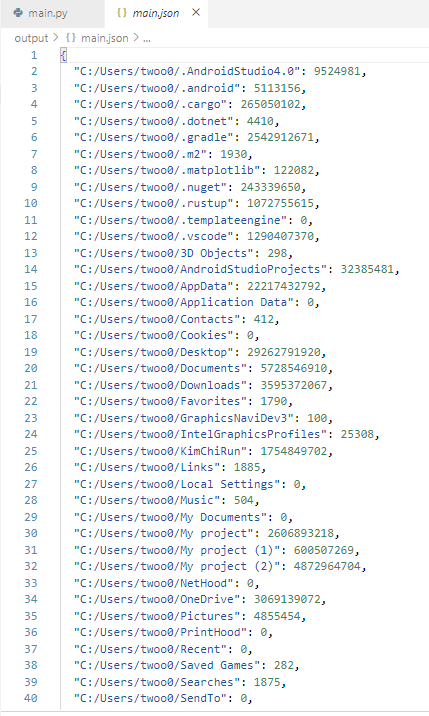
[기본 숙제] Ch.01(01-1, 01-2) 폴더 크기 측정 결과 화면 캡처하기
책에서는 각 기능마다 파이썬 파일을 따로 만들었다. 그러나 내 기준에서는 어쨌든 폴더 크기를 측정하는 프로그램이기 때문에 하나의 파이썬 코드에 전부 넣는 방식으로 수정했다.
결과 화면
 |
 |
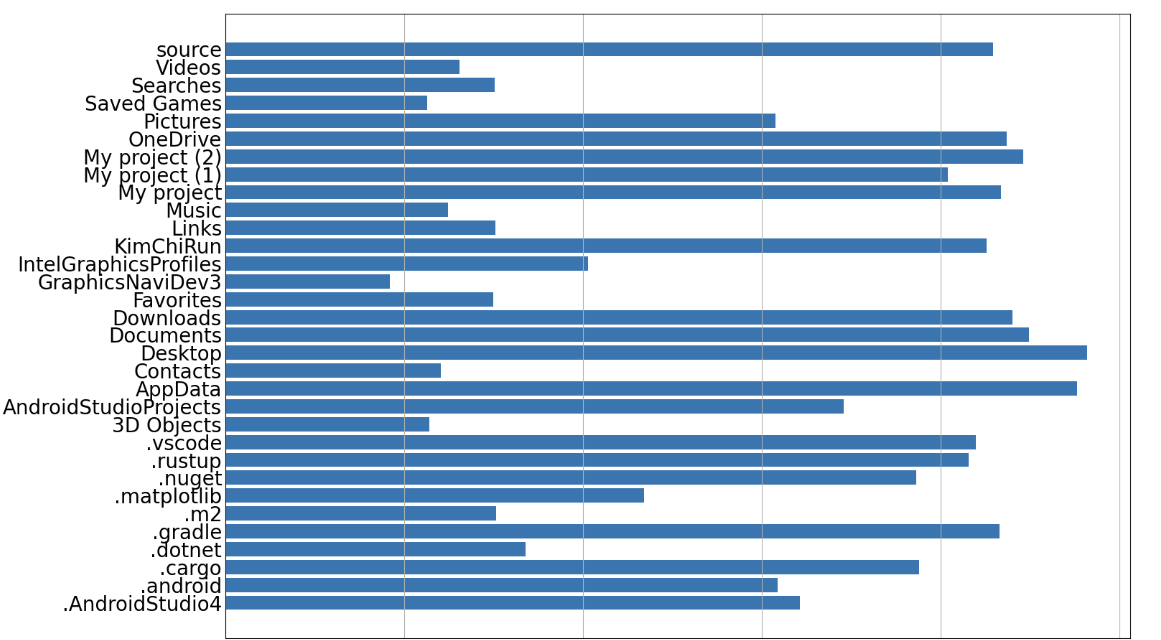
[추가 숙제] Ch.0(01-3) 폴더 크기 측정 프로그램 시각화(차트) 결과 화면 캡처하기
수정한 테스트 코드
더보기
import json
import matplotlib.pyplot as plt
import numpy as np
from pathlib import Path

WORK_DIR = Path(__file__).parent
OUT_DIR = WORK_DIR / "output"
OUT_2_3 = OUT_DIR / f"{Path(__file__).stem}.json"


def get_total_filesize(base_dir: Path, pattern: str = "*") -> int:
    total_bytes = 0
    for fullpath in base_dir.glob(pattern):
        if fullpath.is_file():
            total_bytes += fullpath.stat().st_size
    return total_bytes

def dump_dirnames(base_dir: Path) -> None:
    dirs = []
    for path in base_dir.iterdir():
        if path.is_dir():
            dirs.append(path.as_posix())
    dirs_sorted = sorted(dirs)
    with open(OUT_2_3, "w", encoding="utf-8") as fp:
        json.dump(dirs_sorted, fp, ensure_ascii=False, indent=2)

def load_dirnames() -> list[str]:
    if OUT_2_3.is_file():
        with open(OUT_2_3, encoding="utf-8") as fp:
            return json.load(fp)
    return []

def dump_filesize_from_dirnames():
    dirs = load_dirnames()
    result = {}
    for path_str in dirs:
        path = Path(path_str)
        filesize = get_total_filesize(path, pattern="**/*")
        result[path.as_posix()] = filesize
    with open(OUT_2_3, "w", encoding="utf-8") as fp:
        json.dump(result, fp, ensure_ascii=False, indent=2)

def load_filesize_per_dir() -> dict[str, int]:
    if OUT_2_3.is_file():
        with open(OUT_2_3, encoding="utf-8") as fp:
            return json.load(fp)
    return {}

def dump_plot_data():
    size_per_path = load_filesize_per_dir()
    size_per_stem = {Path(path).stem: size for path,
                     size in size_per_path.items()
                     if size > 0}
    plot_data = dict(
        stem = list(size_per_stem.keys()),
        size = list(size_per_stem.values()),
    )

    with open(OUT_2_3, "w", encoding="utf-8") as fp:
        json.dump(plot_data, fp, ensure_ascii=False, indent=2)

def load_plot_data() -> dict:
    if OUT_2_3.is_file():
        with open(OUT_2_3, encoding="utf-8") as fp:
            return json.load(fp)
    return {}

if __name__ == "__main__":
    #OUT_DIR.mkdir(exist_ok=True)
    #dump_dirnames(Path.home()) #01_01
    dump_filesize_from_dirnames() #01_02
    #dump_plot_data()

    #01_03 시각화 코드
    # plot_data = load_plot_data()
    # log_size = np.log(plot_data["size"])
    # fig, ax = plt.subplots(figsize=(16, 9), dpi=100)
    # #ax.barh(plot_data["stem"], plot_data["size"])
    # ax.barh(plot_data["stem"], log_size)
    # ax.grid(True, axis="x")
    # ax.tick_params(labelbottom=False, length=0, labelsize=20)
    # fig.set_layout_engine("tight")
    # fig.savefig(OUT_DIR / f"{Path(__file__).stem}_numpy.png")
확실히 파이썬 코드로 작성하면 C++에 비해 빠르게 짤 수 있어서 편리한 측면이 있다.
'서평 > IT-책' 카테고리의 다른 글
| [혼만파] 혼공학습단 14기_혼자 만들면서 공부하는 파이썬 2주차 (2) | 2025.07.12 |
|---|---|
| [책리뷰] 모두의 딥러닝 (2) | 2025.07.11 |
| [책리뷰] 더 이상 오해받지 않는 말투의 기술 (1) | 2025.06.30 |
| [책리뷰] 당신은 AI를 어디까지 믿을 수 있나요? (0) | 2025.06.29 |
| [책리뷰] 멀티패러다임 프로그래밍 (0) | 2025.05.25 |
'서평/IT-책' Related Articles
more


